
Scam Awareness: How to Spot Trouble and Stay Safe
Scammers are professionals. They target smart, capable people every day, and there is never any shame in asking for help or wanting to learn more. This guide walks through the most common scams aimed at older adults, how to recognize them, and what to do when something feels off.
First thing to know: if you're reading this because something happened, you are not alone and you are not foolish. Reaching out is the smart thing to do. Have a message you're unsure about right now? Paste it into the free Scam Checker.
Medicare open enrollment runs October 15 to December 7. If you're getting calls or texts about your Medicare plan, read Medicare Open Enrollment Scams: What to Watch For.
Fake emails (phishing)
An email that looks like it's from your bank, a delivery company, or Medicare, asking you to "verify your account" or "confirm a charge" by clicking a link. The link leads to a fake page that steals your password.
- • The email creates urgency—"your account will be closed today."
- • The sender's address looks slightly wrong (a misspelled company name).
- • It asks for passwords, PINs, or Social Security numbers by email.
What to do: Don't click the link. If you're worried it might be real, open your browser and type the company's website address yourself, or call the number on the back of your card—never the number in the email.
A real example: the fake "Amazon Prime" email
This one landed in my own inbox. It's a good example because it looks convincing at a glance—real Amazon logo, tidy layout, official-sounding details. Here's the email, followed by everything that gives it away.
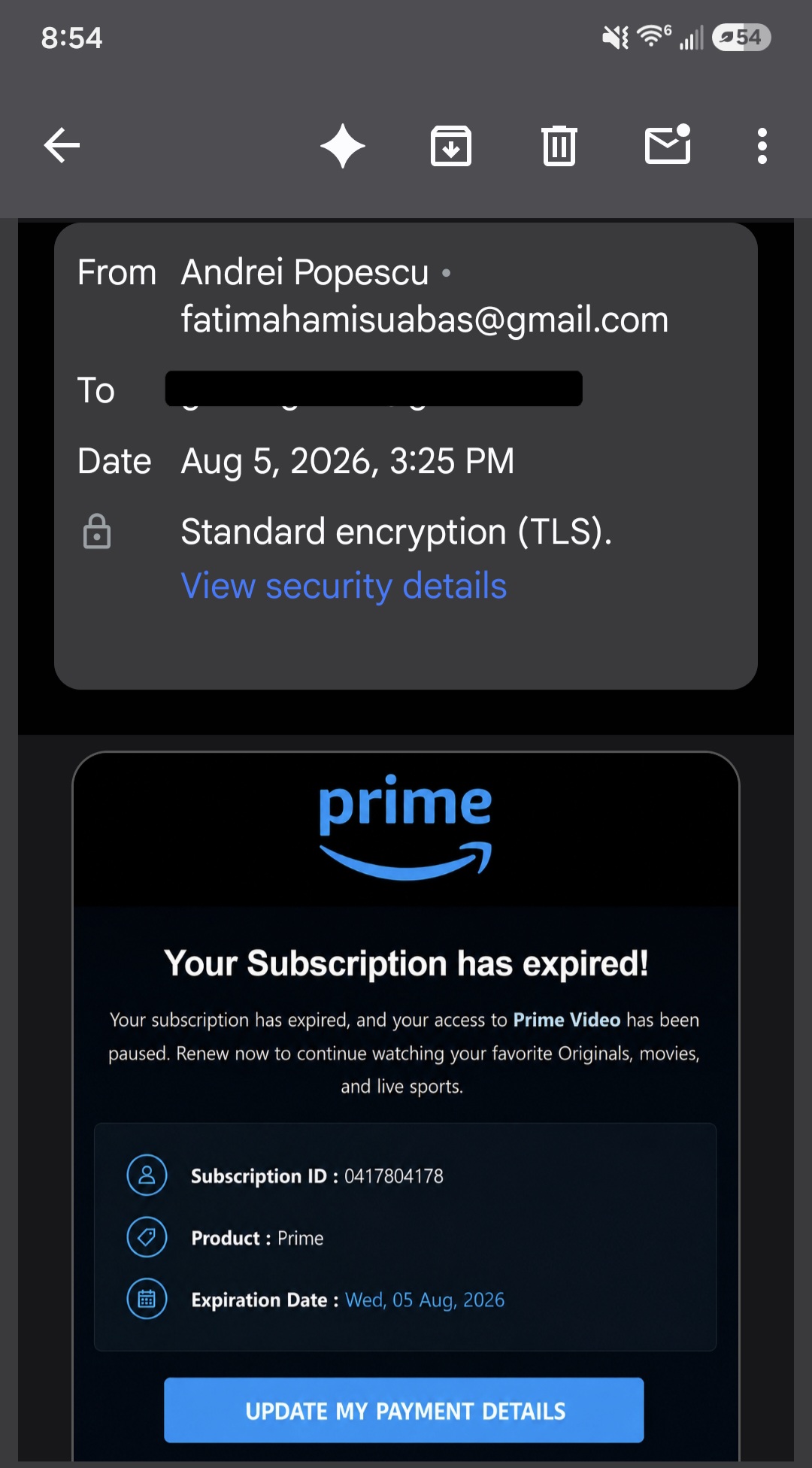
The warning signs, one by one:
- • The sender's address is a personal Gmail account. The name says "Andrei Popescu," but the address is a random @gmail.com address. Amazon emails come from an amazon.com address—never from Gmail, Yahoo, or Outlook. On a phone you often have to tap the sender's name to see the real address, and it's worth doing every time.
- • The name and the email don't match. The display name is one person; the address is a completely different name. Scammers can type anything they like as the display name.
- • It doesn't address you by name. A real company knows who you are and greets you with your name. Blank or generic greetings mean it was blasted out to thousands of people at once.
- • Manufactured urgency. "Your subscription has expired!" with an exclamation point, and an expiration date of today. The whole point is to make you act before you think.
- • Official-looking details that mean nothing. The subscription ID and product line look official, but a made-up number is easy to print. Real details you can't verify are still not proof.
- • A big button that wants your payment card. "Update my payment details" is the whole goal. That link goes to a fake page built to capture your card number and Amazon password.
- • The billing story doesn't add up. Prime renews automatically on a card Amazon already has. If a payment genuinely fails, you'd see it in your account—not be asked to fix it by email.
The safe move: don't touch the button. Open a new browser tab, type amazon.com yourself, and check your account there. If there's nothing wrong on the real site, there was nothing wrong—delete the email. And if you already clicked it, that's fixable: change your Amazon password and call your bank. Give me a call and I'll walk you through it.
Fake tech-support calls
Someone calls saying they're from Microsoft, Apple, or "Windows Support," claiming your computer has a virus. They ask you to install software or give them remote access to "fix" it. Real companies do not call you about viruses on your computer.
- • They want you to install software or read off a code.
- • They ask for payment in gift cards or wire transfer.
- • They threaten that your computer will stop working if you hang up.
What to do: Hang up. If you already gave access, turn off the computer and call me—no judgment, I'll help you figure out next steps.
"Your grandson needs money"
A call or message that sounds like a grandchild or family member in trouble—stuck somewhere, in jail, needs money wired right away. They beg you not to tell anyone. This is one of the most common and cruel scams aimed at older adults.
What to do: Hang up and call that family member back on a number you already know. If you can't reach them, call another family member and ask. A real emergency can wait the two minutes it takes to check.
Online "sweetheart" scams
Someone you met online seems wonderful, but they always have a reason they can't meet in person—and eventually, an urgent reason they need money. A real partner does not ask you to wire money, buy gift cards, or keep the relationship secret from your family.
If you think you've been scammed
Take a breath. You are not the first person this has happened to, and there are clear steps that help:
- Stop and don't send any more money or share any more information.
- If a card or account is involved, call your bank using the number on your card.
- Change passwords for any account you think may have been involved.
- Reach out to someone you trust, or call me—I can help you understand what happened and how to protect yourself going forward.
A note on what I do: I give advice and education. I can't recover money or act on your behalf with banks, but I can help you understand what happened, what steps you might consider, and how to stay safer next time. Learn more on the home page or in the guide for family members.